 RCKit
RCKit  VitaView
 Tend
Tend Push Ups 100
Live in minutes
Add the package, paste one line, and the dashboard fills in by itself. Same four steps on iOS and Android.
dependencies {
    implementation("app.appglance:appglance:1.2.4")
}
// Kotlin, minSdk 21, one dependency (lifecycle-process).
// Nothing to add to the manifest.1Add the package
Xcode → File → Add Package Dependencies… → paste the URL. One Swift package, no dependencies, its own privacy manifest.One Gradle line. A Kotlin library with a single dependency; the INTERNET permission comes with it.
import AppGlance

@main struct MyApp: App {
    init() {
        AppGlance.configure(apiKey: "glance_live_…")
    }
    var body: some Scene {
        WindowGroup { RootView().trackAppLifecycle() }
    }
}
import app.appglance.AppGlance
class MyApp : Application() {
override fun onCreate() {
super.onCreate()
AppGlance.configure(this, "glance_live_…")
}
}
// Sessions and "active right now" are automatic.2Paste one line at launch
Your app's write key from the dashboard, and that is the whole setup. Sessions, installs and "active right now" come for free. Debug and Simulator builds never send unless you say so; TestFlight and Play beta stay separate from production.
3Get a buzz when it matters
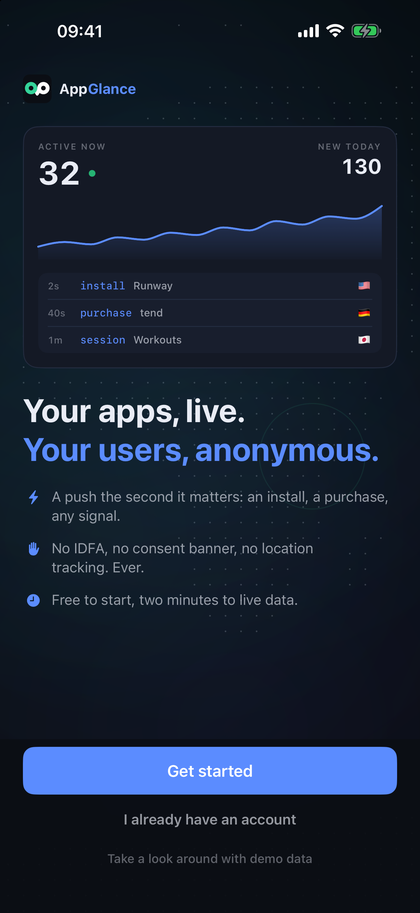
Pick what deserves a push, a purchase, a new install, any signal you name, and send it to your phone through ntfy or Discord, or to your own server as a signed webhook. The AppGlance app for iPhone is on the App Store, and the screen beside this is it.
4Track anything, see it live
Name an event and it shows up in the feed, the Events tab and the charts on its own, with no schema and no setup.
Chart it, use it as a funnel step, or wire it to a push. Never put personal data in a name; that's what identify is for.
Step-by-step quickstart → · or paste one prompt into Claude Code, Cursor or Copilot and let it do the integration.
Everything you actually check, nothing you don't
Built by an indie shipping nine apps, for people who want answers in one glance, not a query language.
Active right now
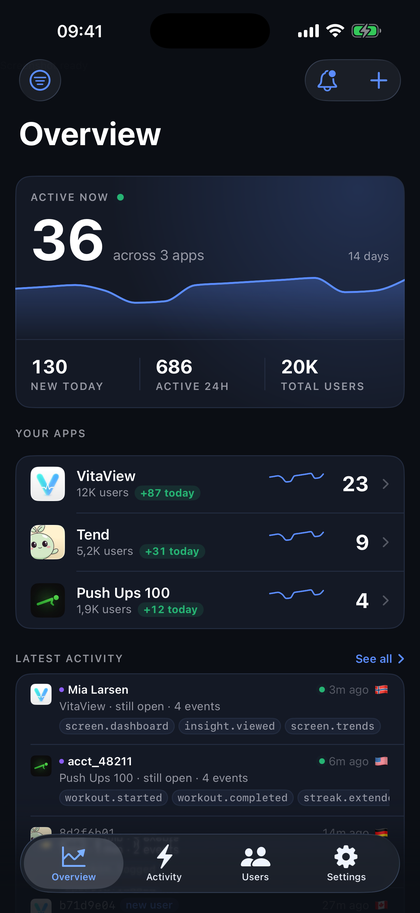
A live count per app, plus today hour by hour in your own timezone. On the paid tiers the dashboard refreshes itself every few seconds; on Free you refresh it yourself.
Sessions as stories
The feed shows one row per visit (install → paywall.viewed → purchase) with how long it lasted and whether they're still there. Click a row for every event inside it.
World map
Where your users are, by country. From the device's region setting by default, never GPS. Switch it to the connecting address if you'd rather have accuracy, and the wizard adds it to your label.
Retention, funnels & sessions
Day 1 / 7 / 30 retention, any-events funnels, session lengths, version and OS breakdowns. The honest health metrics.
Alerts to your phone
A push the moment someone buys, installs, or triggers any signal you choose, via ntfy, Discord or a signed webhook to your own server. Or native push from the AppGlance app for iPhone, free on every plan.
Per-user stories
Pick any install and see when it arrived, its sessions, and every event it fired, without ever knowing who the person is.
iOS & Android, one dashboard
A Swift package for Apple platforms and a Kotlin SDK for Android, with the same two lines, the same events and the same dashboard. Anything else can post JSON to the HTTP API.
Know who, but only if you choose
Apps with accounts can put a name, email, or your own user id on an install with identify. Search by it, see it on the feed. Off by default; anonymous is the point.
Privacy labels, generated
The setup page previews your App Store privacy label, updates it as you pick what to collect, then lists exactly which boxes to tick, plus the Google Play Data safety equivalents.
Same job, a fraction of the weight
Measured, not marketed: what each SDK adds to your app, and what it asks of your users.
| AppGlance | TelemetryDeck | Firebase Analytics | |
|---|---|---|---|
| iOS SDK, compiled | ~300 KB | ~230 KB3 | ~4.3 MB1 |
| Android SDK | 114 KB AAR | 253 KB AAR | ~1.4 MB2 |
| Third-party dependencies | None | iOS: none. Android: Ktor, OkHttp, kotlinx-serialization, AppCompat | Play services, Guava and Firebase core |
| Setup | Two lines, no config file | One call and an app id | Config file, console project, then configure at launch |
| Identifiers | A random install id. No IDFA, ever | A hashed anonymous id | An app-instance id, plus the ad identifier with ad features |
| Free tier | 100,000 events/mo, no credit card | 50,000 signals/mo for accounts since July 2026 | Free at any volume; BigQuery for raw data |
Measured, not marketed: AppGlance re-measured 2026-08-19 at 1.2.2 on the current stable toolchain; the TelemetryDeck and Firebase figures are from 2026-08-16. Numbers age; tell us if they moved.
How these were measured, and the three footnotes
iOS: arm64 release build, code and data of the linked objects (Firebase's binary frameworks measured the same way). 1 The default FirebaseAnalytics product with on-device conversion; about 1.9 MB with FirebaseAnalyticsCore. 2 The Play services measurement libraries; the full runtime classpath resolves to 57 artifacts (10.8 MB) for Firebase, 72 (13.7 MB) for TelemetryDeck and 13 (1.9 MB, all AndroidX and kotlinx that an AndroidX app already ships) for AppGlance. 3 Still 2026-08-16's compiler. A compiler update alone moved our own number from ~200 KB to ~270 KB with zero code change, and 1.2.3 and 1.2.4 added ~30 KB of code on top of that, so TelemetryDeck built today would likely weigh more than shown here too; we publish ours current and theirs as last measured, which flatters them, not us. Versions: TelemetryDeck SwiftSDK main as of 2026-08-01 and kotlin-sdk 7.1.0; firebase-ios-sdk 12.17.0 and firebase-analytics 23.2.0.
Longer write-ups: vs Firebase Analytics, vs TelemetryDeck, vs Mixpanel, vs Amplitude, and all comparisons.
The dashboard in your pocket.
And the push the web can't do.
Same account, same numbers: the overview, the live feed and your users, on your phone. Plus the one thing a browser tab cannot give you: a buzz the moment something happens in your app.
Push notifications, your rules
Every purchase, every install, or only the signals you pick, per app.
Active right now, everywhere
Glance at who's in your apps from the couch. Live tiles, today's chart, the feed.
Users and their stories
Search an install or a name, open the timeline, see every session and event.
Privacy isn't a setting here.
It's the architecture.
Most analytics make you nervous about App Review. This one comes with the answers, and shows you what your App Store label will say before you ship.
No IDFA, no fingerprinting
A random install id, generated on the device and stored there (in the Keychain on Apple platforms) so reinstalls count once. No ATT prompt, ever.
No consent banner
Nothing personal is collected by default, so there's nothing to consent to.
No location tracking
Country comes from the device's region setting: a locale, not a location. No GPS, ever; that would mean a consent prompt. You can opt into country-from-IP instead, and the wizard tells you exactly what it adds to your label.
Privacy labels, answered
The setup wizard previews your label and generates the exact App Store Connect ticks, including what changes if you identify users. Google Play's Data safety answers are the same list.
Delete means delete
Removing an app, or one single user, erases every event it ever recorded. Immediately. CSV export on every table before you go.
Open where it matters
Both SDKs ship as readable source (Swift with its own privacy manifest, and Kotlin), so you can audit every line your app runs.
Data Used to Track You
Joined with other companies' data for ads, or sold to a broker.
Data Linked to You
Tied to a real identity: an account, an email, a name.
Data Not Linked to You
Collected, but with no name attached to it.
Your users are no longer anonymous, so everything above moves into "Data Linked to You", and their email and name get added. You see this happen before you ship it.
Preview of the label the setup page generates. Apple's definitions apply; guidance, not legal advice.
In public beta, on purpose
AppGlance is new and says so. The SDKs are versioned, tested and released, and our own apps run them in production today. What is still growing is everything around them: more apps, more device zoos, more of your feedback turning into the changelog. Beta accounts get the most attention we will ever be able to give.
You talk to the developer
Support goes to the person who wrote the SDK, not a queue. Usually answered the same day, often with a fix in the next release. support@appglance.app reaches a human.
The iPhone app is here
AppGlance for iPhone is on the App Store: the dashboard in your pocket, and a push the moment someone buys. Free, on every plan, the same account as the web.
Founder pricing, locked
Today's prices are launch prices. Subscribe any time during the beta and your price never goes up while you stay subscribed, whatever the public price does after 1.0.
What beta does not mean: fragile. Events are never double counted, every table exports to CSV, deleting an app erases everything immediately, and when we get something wrong the changelog says so in plain words.
Pricing that respects indie math
Simple event-based plans, cheaper than anyone comparable.
Public beta: these are launch prices. Subscribe during the beta and your price stays yours for as long as you stay subscribed.
Free
forever
- Up to 20 apps, iOS & Android
- Every dashboard panel and export
- Alerts & webhooks: iPhone push, ntfy, Discord, your own server
- 90 days of event history
- No credit card
Indie
billed monthly · or $49 a year
- Everything in Free
- 6 months of event history
- Live mode (auto-refresh)
- Email support
- Upgrade any time from the dashboard
Studio
billed monthly · or $149 a year
- Everything in Indie
- 12 months of event history
- Priority support
Prices are in USD and exclude VAT or sales tax, which is added at checkout where applicable.
Sending more than that?
Scale 7,000,000 events / month $39/mo Max 18,000,000 events / month $99/moBoth include 12 months of event history and priority support. Bigger than Max? Email us.
An event is an install, a session, or a signal you track, and your charts never expire, on any plan.
Heartbeats, the over-quota grace, and event history, in plain words
While your app is open with nothing else to say, the SDK sends a quiet "still here" ping we call a heartbeat. It powers "active right now" and session lengths, its cadence follows your plan (every four minutes on Free through every minute on Studio and up), and it never counts toward your events. Over your plan, you keep recording for 7 days, or until 25% past the cap, whichever comes first, with a banner the whole time; past that, billable events stop being stored until the month resets, while presence and session lengths keep working.
Event history is how far back you can browse individual events, funnels and session stories. Charts are forever: daily numbers, totals, retention cohorts and per-user counts are kept for as long as the account exists, on every plan, including Free.
Questions you'd ask
Do I need a consent banner or the ATT prompt?
No. By default the SDK collects a random install id and usage events, and nothing linked to a person, no cross-app tracking, no ad identifiers. Under Apple's definitions that's "Data Not Linked to You" with no tracking, so there's no ATT prompt, and under GDPR there's no personal-data banner to show. The setup wizard hands you the exact App Privacy answers, plus the Google Play Data safety equivalents.
Does it work on Android?
Yes. The Kotlin SDK has the same two-line setup, AppGlance.configure(this, "glance_live_…") in your
Application, the same events and the same dashboard: a Play build shows up as Live exactly like an App Store
build. One app, one write key, both platforms if you ship both. Anything else (a server, a script, Flutter) can
post JSON to the HTTP API.
Is there an app?
Yes. AppGlance for iPhone is on the App Store, free, and on every plan: native push the moment a signal fires, the live feed and your users in your pocket. The web dashboard also works well on a phone, and alerts still reach any phone through ntfy, Discord, or a signed webhook to your own server.
Can I attach a name or an email to a user?
Yes, if your app has accounts: AppGlance.identify(id:email:name:) puts labels on the install,
setUserProperties adds anything else (plan, goal…), reset() forgets it on sign-out.
The install id stays the analytics identity; labels are searchable and shown on the feed. Turn it on in the setup
page and the privacy-label preview shows what changes: Contact Info appears, and your data moves to
"Linked to You". Still no tracking, still no ATT prompt.
What counts as an event? What's a heartbeat?
Installs, sessions, and any signal you track count. While your app is open and has nothing else to say, the SDK also sends a quiet "still here" ping, called a heartbeat, which is how "active right now" and session lengths work. The cadence follows your plan: one ping every four minutes on Free, every two on Indie, every minute on Studio and up, and a busy app never pings at all. Heartbeats and user labels are plumbing: they never appear as events and never count toward your plan.
How is this different from Firebase?
Firebase is free and enormous. It is also Google, it's heavy, and its answers hide behind BigQuery the moment you ask anything specific. This is one package with no dependencies, a dashboard with the six numbers you actually check, and a privacy story that makes App Review boring.
Can I see it before signing up?
Yes. Open the live demo: the real dashboard on sample data from four apps, every tab clickable, no account needed. Create a free account and you'll see it with your own data minutes after adding the package.
What does "public beta" mean? Can I use it in production?
Beta is about breadth, not stability. The SDKs are versioned, tested and released, and our own apps run AppGlance in production today; what is still growing is everything around them: more apps, more device variety, more of the dashboard. Concretely: events are never double counted, your data is exportable as CSV at any time, deleting an app erases it immediately, and anything we get wrong is written up in the changelog. Accounts from the beta keep beta pricing: subscribe at today's price and it never goes up while you stay subscribed.
What happens to my data if I leave?
Delete an app and every event it ever recorded is erased immediately; the button is in plain sight in Setup. Export CSVs any time before you go.